
Most beginner woodworking tool lists answer the wrong question.
They tell you what an established woodworker might eventually own: a table saw, miter saw, router, random-orbit sander, chisels, planer, jointer, drill press, clamps, squares, dust collection, and a long list of accessories.
A beginner usually needs a different answer:
What should I buy first, what can wait, and what problem should trigger the next purchase?
The KuduPost approach is simple:
Buy capabilities, not tools.
Your first purchases should give you enough capability to measure, hold, cut, drill, fasten, and prepare a surface for a real project. After that, the next tool should solve a repeated problem in the projects you are actually building.
This guide is deliberately not a “20 essential tools” shopping list. It is a purchase sequence.
If you need a project that will expose your first real capability gaps, start with our beginner woodworking projects ranking.
Quick Answer: What Should a Beginner Buy First?
For a beginner expecting to build basic projects from dimensional lumber and occasional sheet goods, a practical starting system is:
- a tape measure and reliable square
- a marking tool
- appropriate eye, hearing, and respiratory protection for the task
- basic workholding and a stable work surface
- a drill/driver with the bits needed for the project
- one versatile first saw
- sandpaper and a sanding block
- the glue, screws, and other consumables required by the project
For many beginners who expect to work with both boards and plywood, KuduPost’s default first power saw is a circular saw. That does not mean it is the correct first saw for every person or project. Our full circular saw vs. jigsaw vs. miter saw guide explains the tradeoffs.
You do not need a table saw, router, planer, jointer, drill press, bandsaw, or a full set of chisels to begin making useful projects.
The KuduPost Buy-Order Ladder
| Stage | Goal | Typical Additions |
|---|---|---|
| 1. Core Capability | Become able to complete basic projects | Measure/mark, safety setup, workholding, drill/driver, one saw, hand sanding, project consumables |
| 2. Remove Friction | Make repeated basic tasks easier | Better workholding, random-orbit sander, compatible source capture, better blades/bits/abrasives |
| 3. Project-Driven Expansion | Add an operation a real project requires | Jigsaw, miter saw, router, selected chisels |
| 4. Repeated Bottleneck / Precision | Improve repeatability or stock preparation | Table saw, planer, drill press, bandsaw |
| 5. Specialty | Support a specific workflow | Jointer, spindle sander, scroll saw, specialty joinery systems |
The key idea is that a tool moves up your personal ladder when the work demands it—not because another woodworker owns one.
Stage 1: Build the Core Capabilities First
1. Measure and Mark
A basic layout system does not need to be complicated.
For many beginner projects, a tape measure, a reliable square, and a pencil or other suitable marking tool are enough to start.
The square matters because woodworking is not only about measuring a distance. You also need to transfer a line that is actually square to an edge.
One useful beginner habit is to mark the waste side of the cut. A saw blade removes material—the kerf—so placing the blade on the wrong side of your line can shorten a part even when the measurement itself was correct.
2. Hold and Support the Work
Workholding belongs near the beginning of the purchase order, not near the end.
A cutting tool is much less useful when the workpiece moves unexpectedly or cannot be supported in a stable position.
You do not need an arbitrary number of clamps. You need enough suitable workholding for the project and operation in front of you.
That might mean a small set of general-purpose bar or F-style clamps, a stable bench, sawhorses, or a portable work surface. The correct setup depends on the size of the material and the tool manufacturer’s workholding instructions.
Before buying a second saw, ask whether the real limitation is actually poor support or inadequate clamping.
3. Drill and Drive
A drill/driver combines two capabilities that appear repeatedly in beginner projects:
- drilling holes and pilot holes
- driving screws and other compatible fasteners
That makes it a strong early purchase.
An impact driver can be useful later, especially for repetitive or higher-torque fastening, but it is not required to build a simple box, shelf, tool tote, or many other first projects.
The bits matter as much as the tool category. A drill without the correct drill bits and driver bits does not give you the capability the project requires.
4. Add One Appropriate First Saw
For beginners expecting to cut both dimensional lumber and sheet goods, a circular saw is our default first power-saw recommendation because it can perform both jobs with appropriate setup and guidance.
But the operation should determine the tool.
- If the project needs curves or internal cutouts, a jigsaw may be the missing capability.
- If the work is dominated by repeated crosscuts in dimensional lumber, a miter saw may eventually remove more friction.
- If the projects are small and intentionally hand-tool focused, a suitable handsaw may be enough to start.
Do not buy a jigsaw merely because it feels less intimidating, or a table saw merely because woodworking shops often contain one. Learn the operating requirements of the tool that matches the cut you need to make.
5. Start With Hand Sanding
A sanding block and appropriate abrasive can complete the surface preparation on many small first projects.
This matters because it lets you start building without making a random-orbit sander a mandatory Day 1 purchase.
Power sanding becomes a strong upgrade when hand sanding has become a repeated bottleneck rather than a one-time inconvenience.
6. Treat Safety as Part of the System
Safety equipment is not a separate “advanced shop” category.
The appropriate controls depend on the operation, material, tool, and exposure. For a beginner workshop, that commonly means thinking about:
- eye protection appropriate to the hazard
- hearing protection when noise exposure calls for it
- source capture and cleanup for dust-producing operations
- respiratory protection appropriate to the task when needed
- tool guards and manufacturer-required safety accessories
- stable workholding and material support
Wood dust is a recognized occupational health hazard. NIOSH lists inhalation, skin, and eye exposure routes and respiratory effects for wood dust. Its occupational exposure recommendations are not hobby-shop “safe lines,” so this article does not convert workplace limits into residential thresholds.
Respiratory protection should also not be treated as a magic substitute for dust control. NIOSH describes respirators as an important last line of defense within the hierarchy of controls.
Stage 2: Remove Friction From the Workflow
Once you can complete a project, the next purchase should usually improve a process you already perform.
Random-Orbit Sander
A random-orbit sander is a strong early upgrade when hand sanding repeatedly consumes more time and effort than you want to spend.
It also changes your dust-control needs. NIOSH has documented that random-orbit hand sanders can generate significant amounts of wood dust and has studied exhaust-based controls for these tools.
So a sander purchase should make you think about compatible source capture at the same time.
Compatible Shop Vacuum or Source Capture
A shop vacuum that is compatible with a portable tool’s dust port can be a practical entry-level source-capture option.
It does not mean all dust exposure has been eliminated.
The important capability is capture at or near the source, followed by sensible cleanup and task-appropriate protective measures.
Better Blades, Bits, and Abrasives
Before replacing an otherwise adequate tool, ask whether the problem is actually the accessory.
A blade designed for the material and cut, a sharp drill bit, or the correct abrasive can improve an existing tool’s performance without adding another machine to the shop.
This leads to another KuduPost rule:
The tool is only part of the capability.
Better Workholding
More or better workholding is often a more useful Stage 2 purchase than another cutting tool.
If your projects are becoming larger, your first clamps may no longer reach. If assemblies keep shifting during glue-up, a different clamp style may solve more problems than a new saw.
Stage 3: Buy When a Project Requires the Capability
Jigsaw: Curves and Cutouts
A jigsaw becomes easy to justify when a project asks for a curve, opening, or cutout your current saw cannot make conveniently.
If your last several projects have been straight-cut boxes, shelves, and simple furniture parts, the jigsaw can wait.
Miter Saw: Repeated Crosscuts
A miter saw is excellent at quickly repeating crosscuts and angle cuts in dimensional lumber.
That does not automatically make it a first purchase. A circular saw and square can already make many of those individual cuts.
The miter saw earns its space when repeatability and crosscut volume become the bottleneck.
Router: Profiles, Grooves, and Joinery
A router dramatically expands what you can do, including edge profiles, flush trimming, grooves, rabbets, and many joinery operations.
That is exactly why it can wait.
A beginner building straightforward butt-jointed boxes and shelves does not need to buy one simply because “woodworkers use routers.”
Buy it when your project requires the capability and you are prepared to learn the correct feed direction, bit setup, workholding, and dust-control requirements.
Selected Chisels
A chisel becomes useful for paring, fitting, notching, hinge work, and joinery cleanup.
But a complete chisel set is not automatically a beginner requirement.
Buy the size or sizes your projects actually call for, remembering that maintaining a chisel also introduces a sharpening requirement.
Stage 4: Buy When the Bottleneck Repeats
Table Saw
A table saw can provide highly repeatable ripping and many other operations, but it also carries cost, storage, operating-space, setup, and training requirements.
It is a powerful tool—not a mandatory first woodworking purchase.
The purchase becomes easier to justify when guided portable-saw workflows repeatedly fail to provide the speed, repeatability, or capacity your projects require.
This connects directly to the Table-Saw Trap in our woodworking startup-cost guide: a machine can be valuable and still be the wrong first allocation of a limited budget.
Thickness Planer
A planer becomes relevant when stock preparation becomes part of your normal workflow.
A beginner can postpone that investment by buying surfaced lumber when it fits the project and budget. That avoids immediately taking on the machine’s cost, space, dust, and stock-preparation learning curve.
Drill Press
A drill press earns its place when repeated controlled drilling, depth consistency, or a project-specific boring operation becomes important.
It should not be on a generic first-tool list merely because a complete shop may eventually contain one.
Bandsaw
A bandsaw can handle curves, some resawing operations, and other specialized cuts. It becomes a high-value machine for certain workflows and a space-consuming unused machine for others.
Let the projects decide.
Stage 5: Specialty Tools
Tools such as jointers, spindle sanders, scroll saws, and specialty joinery systems should be evaluated against a specific workflow.
The question is not:
“Is this a useful woodworking tool?”
The question is:
“Does this solve a problem that my current projects repeatedly create?”
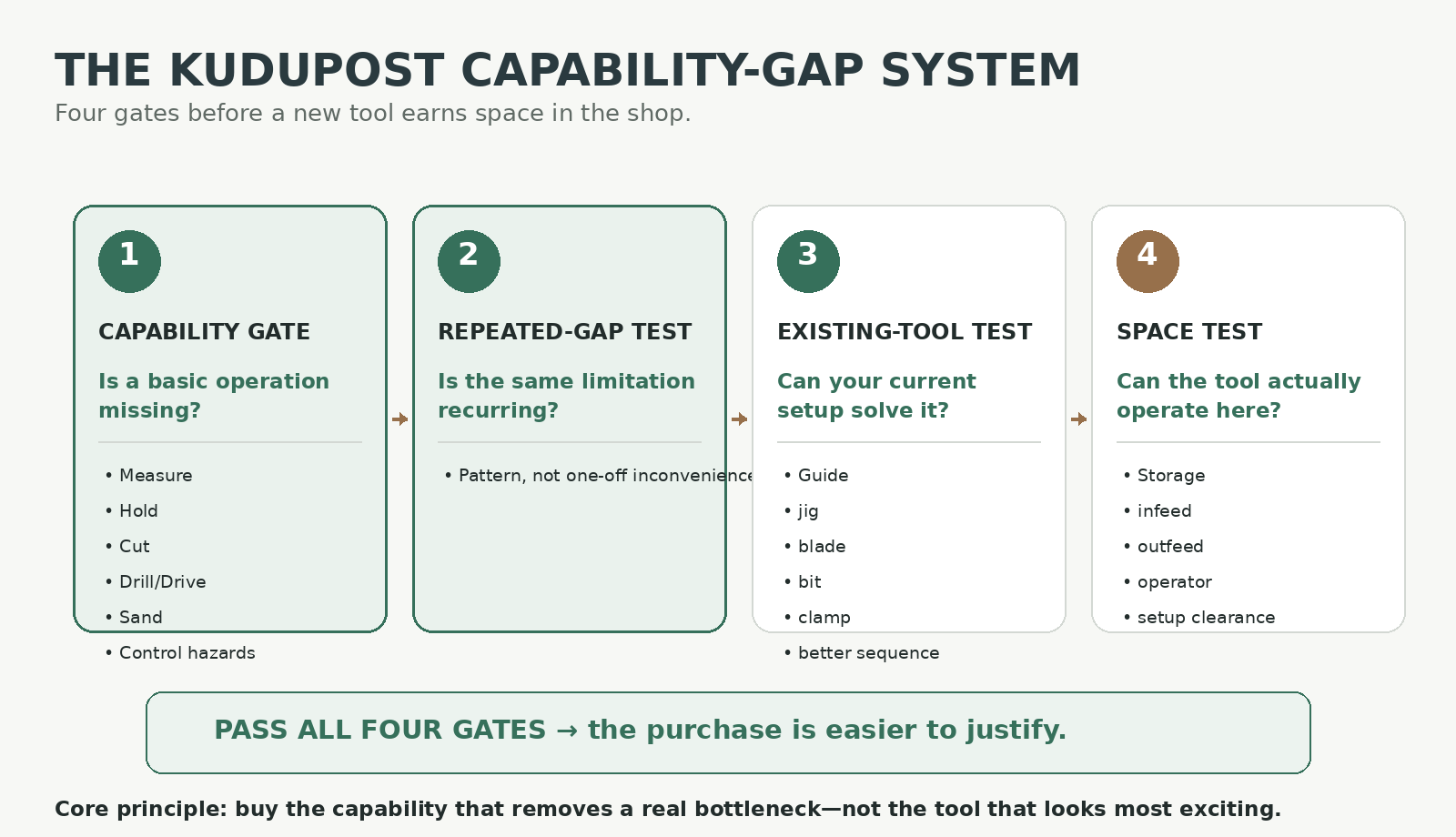
The KuduPost Capability-Gap System
Before buying a new tool, run the purchase through four gates.
Gate 1 — Capability Gate
Can you already complete the core operation the project requires?
- measure and mark
- hold and support
- cut
- drill and fasten
- prepare the surface
- control the relevant hazards
If a basic capability is missing, fix that before buying a specialty tool.
Gate 2 — Repeated-Gap Test
Has the same limitation appeared repeatedly rather than once?
Ask:
- Does this limitation keep appearing in my projects?
- Is the workaround consuming meaningful time, accuracy, setup effort, or control?
- Are upcoming projects likely to need the same capability?
No arbitrary number of projects is required. The point is to distinguish a pattern from a one-off inconvenience.
Gate 3 — Existing-Tool Test
Can something you already own solve the problem well enough with:
- a guide
- a jig
- a better blade
- a different bit
- better workholding
- a different sequence of operations
If yes, the smartest “tool purchase” may be a small accessory or no purchase at all.
Gate 4 — Space Test
For a larger tool, ask:
- Where will it live?
- Where does the material enter?
- Where does the material exit?
- Where does the operator stand?
- What needs to move before the machine can be used?
This is the same principle used in our one-car garage shop guide:
Footprint is not the same thing as operating envelope.
If you are working without a garage, see our small-space woodworking guide before adding stationary machines.
Tool-to-Capability Matrix
The matrix below shows why a purchase sequence matters. Some tools add a genuinely new capability; others mainly make an existing operation faster or more repeatable.
| Tool / System | Measure | Hold | Straight Cut | Curves | Drill / Fasten | Sand | Repeatability | Stock Prep |
|---|---|---|---|---|---|---|---|---|
| Tape + square | Strong | — | Partial* | — | — | — | Partial | — |
| Clamps / support | — | Strong | Partial* | Partial* | Partial* | Partial* | Partial | — |
| Drill/driver | — | — | — | — | Strong | — | Partial | — |
| Circular saw | — | — | Strong | — | — | — | Partial | — |
| Jigsaw | — | — | Partial | Strong | — | — | Partial | — |
| Miter saw | — | — | Strong | — | — | — | Strong for crosscuts | — |
| Random-orbit sander | — | — | — | — | — | Strong | Partial | — |
| Router | — | — | Partial | Partial | — | — | Strong with setup | Partial |
| Table saw | — | — | Strong | — | — | — | Strong | Partial |
| Planer | — | — | — | — | — | — | Strong thickness repeatability | Strong |
*Workholding and layout tools support the operation rather than making the cut themselves.

What Should You Buy Next?
Use the problem—not the product category—as the starting point.
- You cannot safely hold the work: improve workholding/support.
- You cannot make the required basic cut: add the appropriate cutting capability.
- Hand sanding keeps becoming the bottleneck: evaluate a random-orbit sander and compatible dust capture.
- Your projects now require curves: evaluate a jigsaw.
- You keep making batches of repeated crosscuts: evaluate a miter saw.
- You need profiles, flush trimming, grooves, or router-specific joinery: evaluate a router.
- You repeatedly need parallel ripping and greater repeatability: evaluate a table saw.
- You want to work routinely from rough lumber: evaluate a stock-preparation workflow, which may eventually include a planer and jointer.
Do Not Forget the Consumables
A beginner budget often accounts for the machine and forgets everything that makes it useful.
Depending on the project, that may include:
- the appropriate saw blade
- drill bits
- driver bits
- abrasives
- wood glue
- screws or other fasteners
- replacement blades or cutting accessories
- dust bags, filters, or compatible hoses
This is one reason we separate tool-buying sequence from the total startup budget. For realistic $250, $500, and $1,000 beginner setups, see How Much Does It Cost to Start Woodworking?
What About Cordless Battery Platforms?
Battery ecosystems matter because the cost of switching grows as you accumulate compatible batteries, chargers, and bare tools.
But that does not mean a beginner should automatically buy a huge cordless kit.
Before committing deeply to a platform, consider:
- whether the platform includes the tools you are likely to need
- battery compatibility across those tools
- local availability of batteries and service
- total cost, not only the price of the first kit
- whether a particular tool actually benefits from being cordless
The goal is to avoid accidental lock-in without turning the first purchase into a brand-research project.
Should Beginners Buy Cheap or Expensive Tools?
There is no useful universal answer.
Instead, identify what matters for the category:
- Measurement: the tool needs to be trustworthy enough for the work.
- Cutting: blade quality, setup, support, and technique can matter as much as the motor.
- Safety equipment: it must be appropriate to the hazard and practical enough to use correctly.
- Clamps: capacity, reach, and holding behavior matter more than prestige.
- Power tools: consider reliability, ergonomics, compatibility, service, and the accuracy the operation requires.
A beginner does not need premium everything. Nor is “buy the cheapest possible version of everything” a strategy.
Can You Buy Used Woodworking Tools?
Used tools can stretch a budget, but the inspection burden depends on the tool.
Simple hand tools and clamps are often easier to evaluate visually than machines with guards, bearings, fences, cords, batteries, or missing accessories.
For a used power tool or machine, check the exact model and consider:
- missing or modified guards
- damaged cords, plugs, batteries, or chargers
- switch operation
- missing fences, guides, wrenches, or safety accessories
- availability of the manual and replacement parts
- applicable recalls
Do not assume a used machine is appropriate merely because it is inexpensive.
Seven Beginner Tool-Buying Mistakes
| Mistake | Better Question |
|---|---|
| Buying three cutting tools before adequate workholding | Can I safely support and control the material I already cut? |
| Buying a table saw because “real shops have one” | What repeated operation requires table-saw capability? |
| Buying a specialty tool because it is on sale | Which current project problem does this solve? |
| Buying a large combo kit for one needed tool | Will I actually use the other tools in woodworking? |
| Ignoring blades, bits, and abrasives | Do I have the accessory required for the operation? |
| Buying a stationary machine without planning space | What is its operating envelope, not just its footprint? |
| Replacing an adequate tool before improving setup | Would a guide, blade, bit, clamp, or better technique solve the problem? |
Two First Projects That Test the Core Kit
A useful way to evaluate your starter system is to build something before expanding it.
Our Wooden Tool Tote uses basic cutting, drilling, fastening, workholding, and sanding without a table saw.
Our Simple Wooden Storage Box adds a stronger lesson in matched parts, squareness, and fitting the next component to the real assembly.
If those projects reveal a real limitation in your setup, you now have evidence for the next purchase.
Final Buy Order
Buy First — Core Capability
- measure/mark tools
- appropriate safety equipment for the work
- stable support and workholding
- drill/driver + required bits
- one appropriate first saw
- hand-sanding setup
- project-specific glue and fasteners
Buy Next — Remove Friction
- better or additional workholding
- random-orbit sander when hand sanding becomes a bottleneck
- compatible source-capture equipment
- better blades, bits, guides, and abrasives
Buy When Projects Require It
- jigsaw for curves/cutouts
- miter saw for repeated crosscuts
- router for profiles, grooves, flush trimming, and router-specific joinery
- selected chisels for fitting and joinery work
Buy When the Bottleneck Repeats
- table saw for repeated parallel/rip work and greater repeatability
- planer when stock preparation becomes routine
- drill press for repeatable controlled boring
- bandsaw for workflows that benefit from its curve/resaw capabilities
Later / Specialty
- jointer
- spindle sander
- scroll saw
- specialized joinery systems
Final Verdict
The best beginner tool collection is not the one with the most tools.
It is the smallest system that lets you complete real projects safely and with reasonable control—then expands only when the work exposes a repeated capability gap.
Start by making sure you can:
Measure → Hold → Cut → Drill/Drive → Sand → Control the Relevant Hazards.
Then use the KuduPost Capability-Gap System:
Capability Gate → Repeated-Gap Test → Existing-Tool Test → Space Test.
If an existing tool plus a guide, blade, bit, clamp, or better setup solves the problem, you may not need a new machine at all.
That is the difference between building a woodworking shop and simply collecting woodworking tools.
Technical and Safety References
- NIOSH Pocket Guide — Wood Dust
- NIOSH — Respirator Types and Use
- NIOSH — Control of Wood Dust From Random Orbital Hand Sanders
- OSHA 29 CFR 1910.243 — Guarding of Portable Powered Tools
- OSHA 29 CFR 1910.95 — Occupational Noise Exposure
Safety context: OSHA and NIOSH workplace exposure values and employer requirements are cited here as technical occupational references. They should not be treated as universal residential hobby-shop thresholds. Follow the instructions for the specific tools, materials, PPE, and dust-control equipment you use.
Editorial note: This article contains no affiliate links. No manufacturer or retailer paid to be included. The purpose of the guide is to help beginners decide when a capability justifies a purchase, not to maximize the number of products bought.